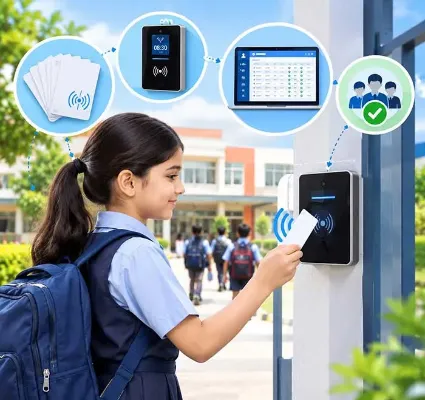
Picture a school owner with two quotes for RFID attendance on her desk. Same school, same 900 students, same week. One quote is almost three times the other.
Neither vendor is cheating. They are just quoting different things. One has priced basic tap cards and two readers, with no software link. The other has priced long-range readers at three gates, printed ID cards, installation, ERP integration and a year of support. On paper, both say "RFID attendance system".
This is why "what does RFID attendance cost?" is so hard to answer with one number. The real answer is: it depends on six things, and once you know them, you can read any quote in ten minutes. This guide walks you through all six.
If you are still deciding between RFID, fingerprint and face recognition, that needs a separate comparison. Here, we'll assume you've chosen RFID and want to buy it well.
The short answer
The price of an RFID attendance system for a school depends on the number of students, the type of card, the type and number of readers, installation, software integration and yearly support. Cards are a per-student cost. Readers are a per-gate cost. Always ask for each of these as a separate line, and compare the three-year total, not the first invoice.
What are you actually paying for?
Every RFID quote, however it's laid out, is made of these six parts.
1. The cards
Each student needs a card or tag. Most schools print it as the school ID card, with photo, name and class, and the chip sits inside.
Cost here is simple: price per card multiplied by student strength. Add a buffer of extra blank cards for new admissions and replacements. Ask whether printing, lanyards and card holders are included. They often aren't.
2. The readers
Readers are the devices that detect the cards. You pay per reader, so the number of gates matters more than the number of students. A school with one entrance needs far less hardware than a campus with four gates and a bus bay.
3. Installation
Mounting, wiring, power points, network cabling, and sometimes gate frames or poles. This is often left out of the first quote and appears later as "site work". Ask for it up front.
4. Software and integration
A reader on its own only produces a list of card numbers and times. The value comes when that data flows into your school system, marks attendance against the right student and alerts the parent.
So ask: is the RFID integration with our school ERP included, or charged separately? If the RFID vendor and ERP vendor are different companies, who makes them talk to each other?
5. Messaging
An "entered school at 7:52 am" alert to parents is the feature everyone wants. App notifications usually cost nothing extra. SMS and WhatsApp alerts are charged per message. With two alerts per child per day, that adds up, so get a monthly estimate for your strength.
6. Support and replacements
Annual maintenance for the hardware, the cost of replacing a faulty reader, and the price of a replacement card. Cards will get lost. Plan for it.
What pushes the price up or down
Student strength: More students means more cards. It's the most predictable line in the quote.
Number of entry points: Every gate that students use needs coverage. Some schools save money by routing all students through one or two gates in the morning.
Where do you mark attendance: At the gate only? In each classroom? On the bus? Each extra point adds readers. Bus attendance pairs well with GPS bus tracking, so parents know the child boarded and where the bus is.
Staff too? Some schools put staff on RFID as well. Many prefer biometric attendance for staff, since it confirms the person and feeds payroll.
Card quality and printing: A plain white card costs less than a full-colour printed PVC ID card with a lanyard. But since students need an ID card anyway, combining the two usually saves money overall.
Existing ERP: If your ERP already supports RFID, integration is simple. If not, you may pay for custom work, or end up with attendance data stuck in a separate program.
Costs schools forget to budget
-
Replacement cards: Set the fee parents pay for a lost card, and publish it before launch. It covers your cost and makes children a little more careful.
-
New admissions mid-year: Keep blank cards in stock, and check whether you can print them in school or must order each time.
-
A spare reader: If your only gate reader fails at 7:40 am, what happens? One spare unit is cheap insurance.
-
Power backup: Readers need power. A small UPS at the gate prevents gaps during cuts.
-
Re-issue every year: If class and section are printed on the card, you'll reprint yearly. Many schools print only their name, photo and admission number for this reason.
Setting it up: a simple five-step plan
Step 1: Walk your gates at 7:45 am. Watch where students enter, where they bunch up and where a reader could be mounted with power and network nearby. Reader placement decides whether the system feels smooth or slow.
Step 2: Clean your student list. Every card maps to one student record. Duplicate names, wrong sections and old phone numbers will cause wrong alerts on day one.
Step 3: Pilot with one gate or one grade. Run it for two weeks alongside the register. You'll learn your real read rate, the real queue time and how many children forget cards.
Step 4: Write the rules. Lost card, damaged card, forgot card today, double scan, network down. Decide who handles each one. Keep the class teacher's register as the fallback, not as a parallel system.
Step 5: Tell parents before launch. Send one clear circular: what the card is, what alerts they'll get, what a replacement costs. Parents who know what to expect complain far less.
Is it worth the money?
Here's how schools usually justify it to their management committee.
Time. Ten minutes of roll call per section per day is a lot of teaching time across a year. RFID gives most of it back.
Safety and trust. A parent who gets an "arrived at school" alert at 7:52 stops calling the office at 8:15. For many schools, this is the real reason they buy.
Cleaner records. Attendance percentages, late-comer lists and monthly reports are ready without anyone compiling them.
Admissions. In a competitive area, "we send you an alert when your child reaches school" is a line parents remember.
None of this works if the data stays inside the reader's own software. It has to reach the school ERP software and the parent mobile app. That's the first thing to check in any demo.
Get an RFID quote you can actually compare
One Flawless offers RFID integration as part of its school ERP, along with student attendance, parent alerts and the mobile app. We don't sell you a box and leave.
Request a demo and quote. Tell us your student strength, number of gates and whether buses are included. We'll suggest the right card and reader type, and give you a line-by-line quote in the format above.

