Every transport in-charge knows this phone call. It's 7:20 am, the bus left the stop five minutes ago, and a worried parent wants to know whether their child made it on board. The attendant is busy, the driver can't answer while driving, and the paper register is in a folder on the front seat.
Multiply that by 15 buses and 40 stops, and you can see why mornings at the transport desk feel like a call centre.
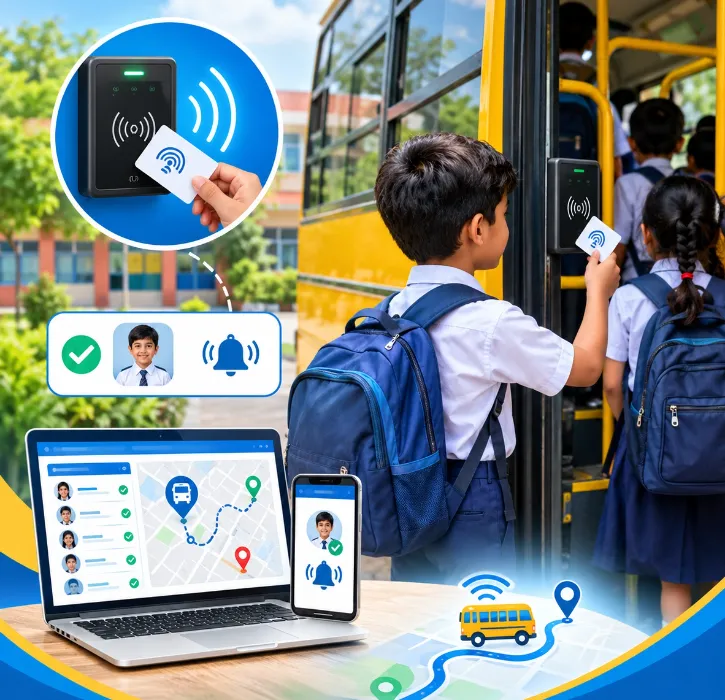
An RFID school management system for buses solves this in a simple way. Each child taps a card on a reader as they board. The system records the tap against that child's name and, if it's set up to, sends the parent a short message: "Aarav boarded Bus 7 at 7:14 am."
No phone call needed. No register to dig through. And at the end of the day, the transport team has a proper record of who travelled on which bus.
This guide explains how RFID boarding alerts work, how they differ from GPS tracking, what to do when a child forgets their card, and what to check before you buy.
How RFID bus boarding alerts work
RFID stands for Radio Frequency Identification. In plain terms, a small chip inside a card sends a unique code to a reader when it comes close. The reader doesn't need to touch the card, and it doesn't need the child to unlock a phone or type anything.
Here's the full journey from tap to alert:
-
Each child gets a card: The school links every RFID card or tag to one student's profile. Many schools simply build it into the student ID card.
-
A reader goes on the bus: It's fitted near the door, where children naturally pass as they climb in.
-
The child taps on boarding: The reader picks up the card's code in a second.
-
The system matches the code to the child: It records the name, bus, time and, where available, the stop.
-
The parent gets an alert: Through the school app or SMS, depending on how your school has set it up.
-
The transport team gets a record: Every tap is saved, so you can check route-wise attendance any time.
Some schools also ask children to tap when they get off, so parents know when their child reached school in the morning or was dropped off in the afternoon.
A good system also handles the small stuff. A child who taps twice shouldn't trigger two alerts. An unknown or lost card should be flagged, not ignored.
RFID vs GPS: they do different jobs
This is the most common confusion we hear, so let's clear it up.
|
RFID |
GPS |
|
|
What it tells you |
Who boarded or got off |
Where the bus is right now |
|
Fitted on |
A reader near the bus door, plus a card for each child |
A tracking device on the bus |
|
Parent sees |
"Your child boarded at 7:14 am" |
The bus moving on a map, and when it's near their stop |
|
What it can't do |
Show the bus location |
Tell you which children are on board |
RFID alone won't show the bus on a map. GPS alone won't tell you whether Riya actually got on.
That's why many schools use both. GPS bus tracking tells parents when to walk to the stop. RFID boarding alerts tell them their child is on the bus. Together, they cover the two questions parents ask most.
Why schools and parents like it
Fewer worried calls in the morning
When parents get an alert, they don't need to call. Your transport desk gets its mornings back.
Real attendance records, not ticks on paper
Paper registers get lost, wet or filled in from memory at the end of the trip. Digital taps are time-stamped and stored. When a parent questions whether their child was on the bus last Tuesday, you can check in seconds.
Problems get noticed early
If a child is expected on Route 4 but hasn't tapped by the last stop, the system can flag it. The attendant checks, calls the parent, and the issue is sorted before the bus reaches school.
More trust from parents
For many families, especially those with young children or long routes, the boarding alert is the single most valued feature of the school app. It's a small message that builds a lot of confidence in your school.
Same card, more uses
The same RFID card can work for RFID attendance at the school gate, so children don't need separate cards for the bus and for school. We covered gate attendance in detail in our RFID attendance system guide.
What if a child forgets their card?
It will happen. Children lose cards, leave them in yesterday's uniform, or swap bags with siblings. Readers occasionally fail, and some routes have patchy mobile signal. A good process plans for this from day one.
Here's a simple approach that works:
-
The attendant checks the child in by name: using a simple manual option on the attendant's device or a short paper backup list.
-
The missed tap is logged: so the transport office can see it.
-
The office reviews missed taps daily: and corrects records through an approved process, not by editing at random.
-
Parents of repeat card-forgetters get a polite nudge: A replacement card process should be quick and clearly priced.
One important rule: the driver should never handle scanning while driving. Boarding checks are the attendant's job. Safety always comes before data.
Also, be honest with parents about what the alert means. It confirms that the child's card was tapped on the bus. It isn't live tracking of the child, and it isn't a guarantee of safety on its own. Clear wording builds more trust than overpromising.
What to check before you buy
The hardware
-
Does the reader work with the cards you plan to use?
-
How well does it hold up to dust, heat and bumpy roads?
-
What does it need for power on the bus?
-
If the network drops, does the reader store taps and send them later?
The alerts
-
Do alerts go by app, SMS or WhatsApp? Is there an extra charge per message?
-
How fast do they arrive? Ask to see a live tap-to-alert demo.
-
Can parents with two children get alerts for both?
-
What happens if a message fails to be sent? Does the office see it?
The software
-
Is each child linked to the right bus, route and stop?
-
Can you handle a temporary route change, a substitute bus or a child staying back for an activity?
-
Can the transport office see a route-wise report of taps and missed taps?
-
Does it link with your school ERP software, so student records and transport fees stay in one place?
Privacy and support
Boarding data shows where a child is and when. Keep access limited to transport and admin staff. Ask how long records are kept, how they're protected, and what the warranty and repair turnaround are for readers. Our post on the DPDP Act and student data is a useful checklist.
A simple rollout plan
-
Map your routes: List buses, stops and the students on each.
-
Issue and link cards: Check every card against the right child before launch day.
-
Pilot two or three routes: for two weeks. Pick one easy route and one difficult one with poor signal.
-
Train attendants: Cover tapping, missed cards, route changes and emergencies.
-
Tell parents what to expect: Explain what the alert says and what to do if they don't get one.
-
Roll out to all routes: once the pilot runs smoothly, then review missed-tap reports weekly for the first month.
How One Flawless fits in
One Flawless is a cloud-based school management software built in India and used by 100+ schools. Transport isn't a bolt-on for us. It sits inside the same system as your students, fees and parent app.
-
RFID integration connects card readers straight to the ERP, so every tap is linked to the right student profile.
-
GPS integration shows parents the bus live and alerts them as it nears their stop.
-
Transport management keeps routes, stops, buses and transport fees in one place.
-
The school mobile app delivers alerts to parents, with WhatsApp integration for families who prefer it.
-
A Delhi-based team helps set up routes, link cards and train your attendants.
The best way to judge it is to watch it work. In the demo, ask us to tap a card, show the parent alert arriving, then show what happens with a missed tap and a substitute bus. If you already have readers on your buses, bring the model number and we'll tell you honestly whether it's compatible.
Conclusion
Parents don't need much to feel reassured. They need to know their child got on the bus, and roughly when it will reach the stop. An RFID school management system answers the first question, GPS answers the second, and together they take a huge load off your transport desk every morning.
Get the basics right: properly linked cards, trained attendants, a clear missed-card process and honest wording in alerts. The technology will then do its job quietly in the background.
Want to see a live boarding alert? Book a free One Flawless demo or call +91 73036 23733. Tell us how many buses you run, and we'll show you the setup that fits.

