It's 7:50 on a Monday morning. Two buses have just pulled in. Parents are dropping children at the gate. And inside, a class teacher is about to spend the first ten minutes of her period calling out forty names.
Now multiply those ten minutes by every section, every day, for a full year. That is a lot of teaching time lost to a register.
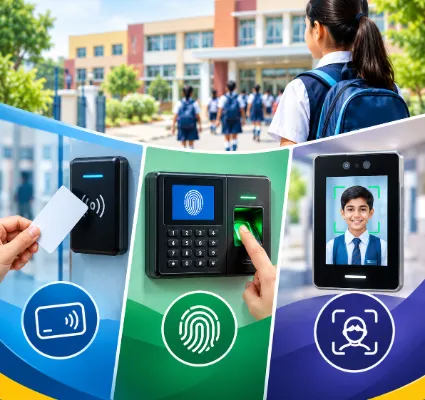
This is why most schools we speak to want to automate attendance. The hard part is choosing how. RFID cards, fingerprint machines and face recognition cameras all promise the same result, and the sales pitches sound alike. But they behave very differently at a busy school gate.
One Flawless runs in 100+ schools, and attendance is the one module every school uses every single day. So here is a plain comparison of RFID vs biometric attendance vs face recognition, with the good parts and the annoying parts of each.
The short answer
For student attendance, RFID is the practical choice for most Indian schools. It is fast, it is affordable, and children already wear ID cards. For staff attendance, biometric works better because it confirms the person and can feed payroll. Face recognition is contactless and clever, but it needs good cameras, steady lighting and a clear privacy policy. Many schools end up using two of the three.
Now the details.
How RFID attendance works
RFID stands for Radio Frequency Identification. In a school, it simply means a small chip inside the student's ID card.
Each card carries a unique number. The student taps the card on a reader, or walks past a long-range reader at the gate. The system picks up the number, matches it to the student and marks them present. It takes about a second.
What schools like about it
- It is quick. A long line of students clears fast, even at peak time.
- Children don't need to learn anything. Wear the card and walk in.
- The same card can work at the gate, on the bus and in the library.
- Parents can get an alert the moment their child enters or leaves.
Where it struggles
The reader sees the card. It does not see the child. So if Rohan leaves his card at home, he shows as absent until someone corrects it. And if he hands his card to a friend, the system won't know.
In real life, this matters less than people fear. Young children rarely have a reason to swap cards, and a quick head count by the class teacher catches the odd case. Still, you will need simple rules for lost cards, damaged cards and replacements. Decide the replacement fee before launch, not after the first fifty requests.
To see how the cards connect to the rest of your school system, have a look at our RFID integration for schools.
How biometric attendance works
Biometric attendance uses something a person can't forget at home. In most schools, that is a fingerprint.
Each person is enrolled once. After that, they place a finger on the scanner. The machine matches it with the stored template and marks attendance.
What schools like about it
-
It confirms the person, not a card. Proxy attendance becomes very hard.
-
There is nothing to carry, nothing to lose and nothing to reprint.
-
It gives clean in and out times, which is exactly what payroll needs.
Where it struggles
Fingerprint scanners and small children don't get along. Little fingers are hard to read. So are wet fingers, dusty fingers after games period, and fingers with a fresh cut or mehndi on them. Every failed scan means another try, and the queue behind keeps growing.
Then there is the shared surface. Hundreds of children touching one sensor every morning is a hygiene question some parents will raise.
For adults, none of this is a big problem. That is why biometric is the most common choice for teachers and office staff. With One Flawless, the ERP takes data from the biometric attendance machine your school already uses. Present days, absences and late arrivals flow straight in. Nobody has to type them up at the end.
How face recognition attendance works
Here, a camera does the work. The student walks into a marked area. The camera captures the face, and software compares it with the enrolled photos. If it finds a match, attendance is marked.
What schools like about it
-
No card and no touching. Students just walk in.
-
It checks the person, the way biometric does.
-
It feels modern, and many parents like that.
Where it struggles
Face recognition is fussy about conditions. Morning sun behind the students. A dim corridor. A camera fixed too high. Children walking in a bunch with their heads down. All of these reduce accuracy. Faces also change quickly at school age, so enrolment photos need to be refreshed.
It asks more from your campus too. You need good cameras, a stable network and someone who can maintain the setup.
And it raises the most serious privacy questions of the three. You are storing children's facial data. Parents will ask where it is kept and who can see it. You should have those answers ready before the first camera goes up.
Got it. You want the same differentiation without using a table, so it can be inserted naturally into the blog.
RFID vs Biometric vs Face Recognition: Key Differences
1. RFID Attendance
RFID attendance identifies the student through an RFID card or tag. The student simply taps or brings the card close to an RFID reader, and the system records the attendance.
Key points:
- Requires an RFID card or tag.
- Completely contactless.
- Very fast, making it suitable for busy school entrances.
- Generally easy for young children to use.
- Can also be used for school buses, library access and student identification.
- The main concern is that a student can potentially share their card with someone else.
- Common issues include lost, damaged or forgotten cards.
- Requires RFID readers and cards as the primary hardware.
- Generally involves fewer privacy concerns than biometric technologies because it identifies the card rather than a biological characteristic.
Best suited for: Schools looking for a simple, fast and scalable attendance system, especially where students already use school ID cards.
2. Biometric Attendance
Biometric attendance identifies the actual person, commonly using a fingerprint. Instead of carrying a card, the student or staff member places their finger on a biometric scanner.
Key points:
- Does not require an attendance card.
- Identifies the individual rather than an ID card.
- Usually requires physical contact with the scanner.
- Attendance is generally recorded one person at a time.
- Can be useful for teachers and staff attendance.
- The possibility of simple card-sharing or proxy attendance is lower than with RFID.
- Failed fingerprint scans can occur.
- Shared fingerprint devices require appropriate hygiene and maintenance practices.
- Requires biometric scanners and enrollment of users.
- Biometric information creates higher privacy and data-protection considerations.
Best suited for: Schools that want person-based attendance verification, particularly for teachers and staff, and have the infrastructure and governance processes to manage biometric systems.
3. Face Recognition Attendance
Face recognition identifies the person using facial characteristics captured through a camera. Students generally do not need to carry a card or touch a device.
Key points:
- No physical attendance card is required.
- Completely contactless.
- Can process attendance quickly when the system and environment are suitable.
- Can be convenient for students because there is no card or physical scanner.
- The system requires cameras, recognition software and suitable network infrastructure.
- Accuracy can be affected by lighting, camera positioning and other environmental conditions.
- Students may need to be re-enrolled when recognition quality changes or the system requires updated data.
- Proxy attendance through simple card sharing is not an issue.
- Facial and biometric information creates significant privacy and data-protection considerations.
Best suited for: Schools with strong technical infrastructure that want a contactless, person-based attendance experience and are prepared to address the associated privacy and governance requirements.
Which One Should a School Choose?
The three technologies address attendance in different ways.
- RFID is focused on speed and convenience.
- Biometric attendance is focused on person-based verification.
- Face recognition is focused on contactless person-based identification.
For a school with young children and heavy morning traffic, RFID may be operationally convenient. For staff attendance, a biometric system may be considered where person-based verification is important. A school with suitable camera infrastructure may consider face recognition for a contactless experience.
Ultimately, schools should evaluate speed, student age, campus infrastructure, proxy risk, hardware requirements, maintenance, privacy, cost and ERP integration before selecting an attendance technology.
Which one suits a small school?
If you have a few hundred students and one main gate, keep it simple. One or two RFID readers at the gate will cover students. A single biometric machine near the staff room will cover teachers.
You don't need the newest technology. You need one that works every morning without a technician on call.
Which one suits a large school?
With 1,500 or 2,000 students, the real test is the morning rush. Most of your students arrive within the same 15 minutes. If every child has to stop and press a finger, the queue will reach the road.
So large schools should plan around speed. Ask yourself:
-
How many gates do we have, and how many readers does each gate need?
-
What happens if one device fails at 7:45?
-
If the internet drops, does attendance still record and sync later?
-
Are bus students marked on the bus or at the gate?
RFID handles this kind of load well. That is why we usually suggest it for student entry on big campuses.
Where does the attendance data go?
Most schools skip this question, and it is the one that matters most.
Here is a mistake we see often. A school buys attendance machines from a hardware dealer. The machines work fine. But the data sits inside the machine's own software. So every evening, someone in the office exports an Excel sheet and types it into the school system.
That is not automation. That is a new kind of register.
An attendance device is only useful when it talks to your school ERP software. Once it does, a single tap can do several jobs at once:
-
Mark the student present in the class record.
-
Send an alert to the parent on the school mobile app.
-
Update attendance percentages and reports with no manual work.
-
For staff, pass leave and late marks on to payroll.
-
For bus students, work alongside GPS bus tracking, so parents know the child is on board and where the bus is.
Absence messages, notices and circulars can go out from the same parent communication portal. Parents get everything in one place instead of five.
So before you compare devices, ask every vendor one thing: "Will this work with our ERP, and can you show me a school that is using it?"
A word on privacy and children's data
Fingerprints and faces are sensitive personal data. With students, you are handling the data of minors. India's Digital Personal Data Protection Act, 2023 has specific rules on processing children's data, including parental consent. We are not lawyers, so please check the details with your legal adviser. As a rule of thumb:
-
Tell parents clearly what you collect and why.
-
Take their consent in writing.
-
Ask your vendor where the data is stored and who can access it.
-
Ask how the data is deleted when a student leaves the school.
This is one more reason many schools pick RFID for students. A card number is far less sensitive than a child's fingerprint or face.
7 questions to ask before you buy
-
How many students and staff will use the system?
-
How many entry points need a device?
-
How many people arrive in the busiest 15 minutes?
-
Does it connect to our ERP, or will someone re-enter the data?
-
What happens when a device or the network goes down?
-
Who repairs the hardware, and how quickly?
-
What is the full cost over three years, including cards, devices, installation and support?
Hardware is often quoted separately from software, so get every line in writing. Our guide to school ERP price in India shows where these extra costs usually hide.
Our recommendation
There is no single winner. But there is a pattern that works for most schools.
-
Students: RFID. It is fast at the gate, easy for every age group and light on privacy.
-
Teachers and staff: Biometric. It confirms the person and keeps payroll honest.
-
Face recognition: Worth a look if you already have good cameras and a strong network, and you are ready to handle consent and data security properly.
Start with the problem you want to fix. Is it lost teaching time? Parents worrying about safe arrival? Payroll disputes? Your answer usually points to the right system.
If you are comparing vendors right now, our guide on how to choose the best school ERP software in India lists the demo questions we would ask in your place.
See it working before you decide
One Flawless supports both RFID and biometric integration, along with student and staff attendance, parent alerts and a mobile app for parents and teachers.
Book a free demo and we will show you the full flow: a card tap at the gate, the alert on a parent's phone and the report on the principal's dashboard. Tell us your student strength and the number of gates, and we will suggest a setup that fits your school.

