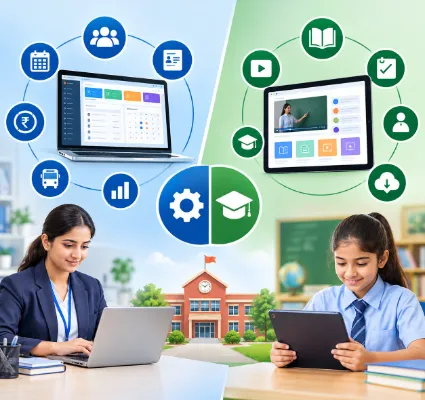
Ask a school accountant what software the school uses, and you will hear one name. Ask a Class 9 teacher, and you may hear a completely different one.
That is how it goes in a lot of Indian schools today. The office runs on an ERP for fees and admissions. Teachers picked up an online classroom tool a few years ago, when lessons moved online almost overnight, and many never stopped using it. Parents are left with two apps, two logins and no idea which one has the homework.
Then renewal time comes around, and someone on the management committee asks a fair question. Are we paying for two things that do the same job?
The honest answer is: sometimes yes, sometimes no. It depends on what your school really does with digital learning. This guide will help you work that out in about ten minutes.
The short answer
Every school needs an ERP, because every school has admissions, fees, attendance and exams to run. Not every school needs a separate LMS. If digital learning at your school means homework, assignments, lesson plans and the odd live class, an ERP with built-in learning features will usually cover it. A dedicated LMS makes sense when you run large online course libraries or self-paced programmes.
What does a school ERP do?
Think of the ERP as the school office, moved onto a screen. It looks after the running of the school: admissions, student records, attendance, fees, exams and report cards, timetables, staff and payroll, transport, and messages to parents. Most importantly, it keeps all of this on one student record. So the fee clerk, the class teacher and the principal are all looking at the same child, not three different files.
We won't go deep into this here. If you want the full picture, we have covered it in school ERP vs school management software.
What does an LMS do?
LMS stands for Learning Management System. If the ERP is the school office, the LMS is the classroom, moved onto a screen.
Picture a Class 8 science teacher starting the chapter on photosynthesis. With an LMS, she can:
-
upload her notes and a short video,
-
set a worksheet with a due date,
-
run a quick quiz at the end of the week,
-
see who has submitted and who hasn't,
-
and check which questions most of the class got wrong.
Google Classroom and Moodle are two names you may already know. Everything in an LMS is built around a course, a lesson and a learner. It has no interest in whether the bus fee is paid. So here is the simplest way to remember the difference:
The ERP runs the school. The LMS runs the learning.
Yes. Keep it very compact and use a “At a Glance” bullet format without adding explanations.
School ERP vs LMS: Key Differences
School ERP
-
Main job: Run school's operations
-
Admissions & student records: Core feature
-
Fees & accounts: Core feature
-
Attendance: Whole school, daily
-
Exams & report cards: Core feature
-
Transport, staff & payroll: Covered
-
Homework & assignments: Often included
-
Videos, notes & course content: Limited, varies by product
-
Learning progress reports: Basic
-
Parent communication: Core feature
-
Main users: Office, management, teachers, parents
LMS
-
Main job: Deliver and track learning
-
Admissions & student records: Basic profile only
-
Fees & accounts: Not covered
-
Attendance: Per class or course, if at all
-
Exams & report cards: Quizzes and online tests
-
Transport, staff & payroll: Not covered
-
Homework & assignments: Core feature
-
Videos, notes & course content: Core feature
-
Learning progress reports: Detailed
-
Parent communication: Limited
-
Main users: Teachers and students
In Short
School ERP = School operations
LMS = Learning and course management
Look closely and you will notice that the two lists don't really compete. They meet in the middle.
Where the two overlap
This middle ground is the reason schools get confused. Homework, assignments, lesson plans, live classes and marks can sit in either system.
Many school ERPs now include these learning features. One Flawless is built as School ERP and LMS software. Along with admissions, fees, attendance, exams and transport, it includes lesson planning, homework and assignments, live class management, timetables and the library. Students and parents see homework, results and the e-diary in the same school mobile app they use for fees and attendance.
So the real question is not "ERP or LMS?". It is "how much learning technology does our school need?"
When one platform is enough
For a large number of K-12 schools, one connected platform does the job. You are probably in this group if:
-
most teaching happens in the classroom, face to face,
-
digital learning mainly means homework, assignments, notes and the odd live class,
-
teachers want to plan lessons and share work without learning a new tool,
-
parents want one app, not three,
-
and your office wants one login, one vendor and one support number.
In this case, a separate LMS often becomes a tool that is paid for and barely opened. We have seen schools keep one running for two or three teachers who like it, while everyone else sends homework on WhatsApp.
When a separate LMS is worth it
A dedicated LMS earns its place when learning online is a big part of what you offer. For example:
-
you have built a large library of recorded video lessons,
-
students follow self-paced courses outside school hours,
-
you run online programmes for learners who are not your regular students,
-
teachers create detailed online tests with question banks,
-
or you want deep reports on how each student moves through a course.
If that sounds like your school, keep the LMS. But don't let it live on an island. Make sure it shares data with your ERP.
The hidden cost of two systems that don't talk
Here is a small example. Aarav moves from 7B to 7C in the middle of the term.
The office updates his section in the ERP. Done in a minute. But the LMS still thinks he is in 7B. So he keeps getting 7B's homework and misses 7C's worksheet. His mother calls the school. The class teacher messages the computer teacher. Someone finally fixes it by hand a week later.
Now think about how often this kind of change happens in a school year:
-
new admissions in April and again in July,
-
section changes,
-
students who leave with a transfer certificate,
-
teachers who join, leave or swap classes,
-
parents who change their phone number.
Each change has to be made twice. Each missed update turns into a parent complaint. And you are paying two subscriptions, running two rounds of staff training and chasing two support teams.
If you are adding up costs, our guide to school ERP price in India shows how to compare quotes over three years rather than one.
What parents really want
Parents don't think in terms of ERP or LMS. They have simple questions.
Did my child reach school? What is today's homework? When are the exams? Are the results out? Is any fee due? Where is the bus?
If the answers are spread across two apps and a WhatsApp group, parents stop checking all of them. If they sit in one app, parents use it every day. That is good for the school too. Fees come in faster and fewer calls reach the front office.
This is why we tell every school to judge software from the parent's phone first. A single app backed by one parent-teacher communication portal beats three clever tools that nobody opens.
A 9-question checklist before you buy
Sit down with your principal, one senior teacher and your accountant. Answer these together.
About running the school
-
Which office tasks still run on registers or Excel?
-
Do we need fees, attendance, exams and transport in one place?
-
Can parents see everything in one app today?
About learning
-
How many teachers actually use online lessons or quizzes each week?
-
Do we need recorded video courses, or only homework and live classes?
-
Do we need detailed learning reports, or are exam results and report cards enough?
About working together
-
If we keep two systems, will student and class data sync on its own?
-
Can teachers, students and parents use a single login?
-
Who do we call when something breaks?
If your honest answers to 4, 5 and 6 are "a few", "only homework and live classes" and "report cards are enough", you don't need a separate LMS.
So, do Indian schools need both?
Here is our view after working with 100+ schools.
-
You need an ERP. No debate: Admissions, fees, attendance and exams don't run themselves.
-
Most K-12 schools don't need a separate LMS: An ERP with homework, assignments, lesson planning and live classes covers daily needs.
-
Some schools need both: If online courses are a serious part of your offering, keep a dedicated LMS and connect it to your ERP.
The goal is not to own more software. The goal is to give teachers, parents and the office one place to look.
Still shortlisting vendors? Our guide on how to choose the best school ERP software in India lists the questions to ask in every demo.
See ERP and learning tools on one login
One Flawless brings school ERP software and learning features together: admissions, fees, attendance, exams, lesson planning, homework, live classes and a mobile app for parents, teachers and students.
Book a free demo and tell us how your teachers share lessons and homework today. We will show you what can move onto one platform, and we will tell you honestly if a separate LMS still makes sense for your school.

