Most school libraries still run on an accession register and a stack of issue cards. It works, more or less, until the end of the year. Then the librarian spends weeks chasing overdue books, matching cards to students who've changed sections, and trying to work out which books simply vanished.
A library module inside your school ERP doesn't change what a good librarian does. It removes the clerical work that gets in the way: writing, searching, counting and chasing. This guide explains what to look for.
The short answer
School library management software should let you:
- catalogue every book with accession number, title, author, subject and location;
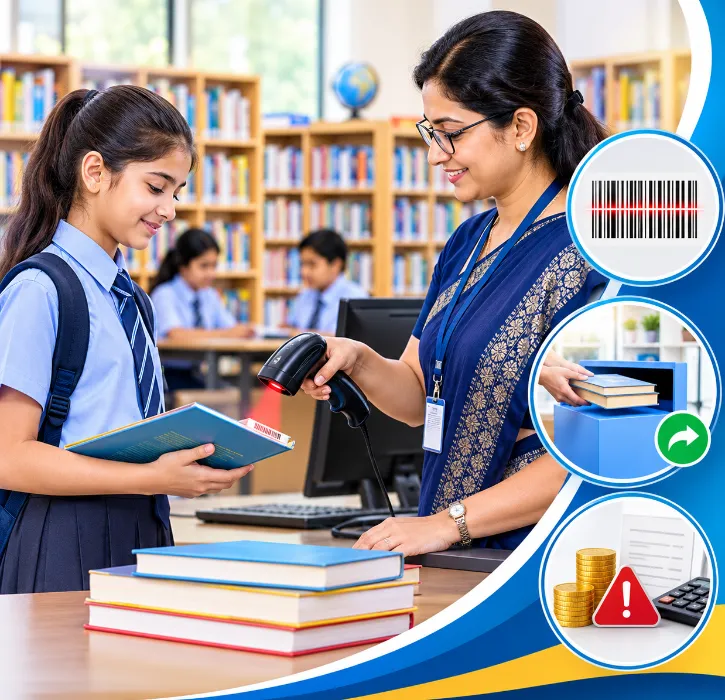
- issue and return books by scanning a barcode, in seconds;
- link each issue to the student or staff member's ERP record, so class and contact details are always current;
- send overdue reminders and calculate fines by your rules;
- run stock verification and see what's missing;
- show reading reports by student, class or subject.
When the library is part of the ERP, there's no separate list of students to maintain, and a student who leaves can be stopped from leaving with library books too.
Why a standalone library register falls short
Paper registers and standalone library programs share one problem: they don't know what's happening in the rest of the school. The librarian has no automatic way to know when a student changes section, leaves the school or has a parent's phone number updated. So reminders go to the wrong class teacher, and books leave with departing students.
When the library module reads from the same student records as admissions and attendance, those gaps close.
1. Cataloguing
Cataloguing is the biggest one-time job, and the one most worth getting right. For each book, record:
- accession number, unique to that copy;
- title, author, publisher and edition;
- subject or category, using the classification your library follows;
- shelf location;
- number of copies, and the date each was added.
If you're starting from a paper register, ask the vendor whether you can import your existing list from Excel, so the librarian isn't typing thousands of entries by hand.
2. Barcode issue and return
Barcodes are what make a library system feel fast. Each book gets a barcode label linked to its accession number, and each student's ID card carries their own identifier.
At the counter, the librarian:
-
scans the student's ID card, or searches by name or admission number;
-
scans the book's barcode;
-
the system records the issue with the due date.
Returns are just as quick: scan the book, and it's marked as returned, with any fine calculated automatically.
This speed matters most during library periods, when a whole class arrives at once. A process that takes 20 seconds per child instead of two minutes gives students more time to actually read.
The hardware is simple: a barcode scanner at the counter and a label printer. Ask whether the vendor supports the scanner models you already have.
3. Rules for different users
Libraries usually have different rules for different users. The ERP should let you set, for example:
- how many books a primary student, a senior student and a teacher can borrow;
- how long each group can keep a book;
- whether reference books can be issued at all;
- fine amounts, grace periods and exemptions.
Set these once, and the system applies them at every issue.
4. Overdue reminders and fines
Chasing overdue books is the task librarians most want to hand over. Good software:
- shows a daily overdue list by class;
- sends reminders to students or parents through the school app;
- calculates fines according to your rules;
- lets fines be added to the student's fee account or collected at the counter, depending on your policy.
Some schools prefer not to charge fines at all, especially for younger children, and use reminders alone. The software should support both approaches.
5. Clearance before a student leaves
When a student leaves or graduates, the office often needs a "no dues" check before issuing a transfer certificate. If the library is in the ERP, outstanding books show up automatically in that check, alongside any fee dues. No more phone calls to the library to ask whether a student has returned everything.
6. Stock verification
Annual stock verification is one of the most tiring library tasks. With barcodes, the librarian scans every book on the shelves, and the system compares the scans with the catalogue. You get a list of:
- books that are on the shelf;
- books that are issued;
- books that are missing.
What used to take days of ticking registers can take a fraction of the time.
7. Reading reports
Once issue data is digital, reading patterns become visible. You can see:
- which students borrow most and least;
- which books and subjects are most popular;
- how borrowing changes across classes or terms.
These reports help the librarian decide what to buy next, and help class teachers encourage reluctant readers. As with any student data, keep them for the right people: reading habits are personal, and they shouldn't become a public league table.
Class libraries, reading corners and digital resources
Many schools don't have just one library. Primary classes often keep reading corners in each classroom, departments hold their own reference books, and some schools subscribe to e-books or online journals. If only the main library is in the system, a large part of the school's collection stays invisible.
Class libraries: You can treat each classroom collection as a separate location in the same catalogue. Books are still accessioned and labelled centrally, but the class teacher issues and returns them within the class. At the end of the year, stock verification covers every location, not just the main shelves.
Department collections: Science, language and social science departments often keep reference sets. Recording them as separate locations shows what the school owns and stops departments from buying duplicate copies.
Digital resources: E-books and online subscriptions don't need barcodes, but they do need a record: what the school subscribes to, renewal dates, how many users are allowed and who has access. Even a simple list in the library module avoids paying for subscriptions nobody uses.
Linking the library to the rest of the school
The library is most useful when it's connected to student and staff records rather than kept in a separate register.
- New admissions appear in the library automatically, with their class and section, so the librarian doesn't create member records by hand.
- Promotions at the start of the year move every student to their new class without any extra work.
- Leavers are flagged if they still have books out, so dues can be cleared before certificates are issued.
- Staff who leave are checked the same way during their exit process.
- Reading data can sit alongside other information about a student, for example when a class teacher is preparing for a parent-teacher meeting.
A demo checklist for school libraries
- Import 50 books from your Excel register: Avoids months of manual entry.
- Issue and return a book by barcode: Speed at the counter.
- Different borrowing limits for students and teachers: Your rules, not a default.
- Today's overdue list for Class 7: Practical daily use.
- A student who leaves with a book outstanding: "No dues" check before TC.
- Stock verification for one shelf: Annual audit workflow.
- Most-borrowed books this term: Purchasing decisions.
Rollout tips
- Barcode in batches: Start with the most-borrowed sections, then work through the rest over a term.
- Use existing ID cards: If student ID cards already carry a barcode or admission number, use that for issuing.
- Run old and new side by side for a week, then switch fully.
- Train student library monitors, if you use them, on scanning and returns.
Encouraging reading, not just tracking books
Library software is often bought to stop books going missing. Its bigger value is helping more children read more.
- Reading lists by class help teachers and parents choose suitable books.
- New arrivals can be shared with students and parents through the school app.
- Reading challenges, such as a target number of books per term, are easy to track when every issue is recorded.
- Class-wise borrowing reports show which classes visit the library often and which rarely do, so the librarian can plan visits with class teachers.
Celebrate readers, not just returns. A short mention in assembly for the class that borrowed the most books does more for reading than any overdue fine.
How One Flawless supports school libraries
One Flawless is a cloud-based school ERP software built in India and used by 100+ schools. Library management is part of its academic modules, and it works alongside:
- POS and barcode integration, so issues and returns can be scanned;
- student and staff records shared across the ERP;
- the mobile app, for notices and reminders to students and parents;
- MIS reports for the principal and management.
Bring your current accession register and borrowing rules to the demo, and we'll show you how they'd be set up.
Conclusion
A school library should be a place for reading, not record-keeping. When cataloguing, issues, returns, reminders and stock checks are handled by the ERP, the librarian gets time back for what matters: helping students find books they'll actually enjoy.
Want to see barcode issue and return in action? Book a free One Flawless demo or call +91 73036 23733.